Every architect knows this moment: the design session went great, the whiteboard is covered in boxes and arrows, someone snaps a photo — and then that photo dies in a Slack thread. The knowledge is captured, but it isn't usable. Before anyone can review it, extend it, or generate specs from it, someone has to spend an hour manually redrawing the whole thing in a diagramming tool.
The new Magic Wand in FloDraw removes that hour entirely. Paste any architecture image onto the canvas, click one button, and watch it dissolve into a real, editable diagram — every box a selectable shape, every arrow a live connector.
How It Works
- Get the image onto the canvas. Paste it with
Ctrl+Vor simply drag and drop the file. Whiteboard photos, screenshots from Confluence or old PDFs, exported images from other diagramming tools — anything that visually depicts a system works. - Click the Magic Wand. Select the image and a wand button appears right on it. One click sends the image to FloDraw's vision AI.
- Watch it dissolve. The AI reads the boxes, labels, and arrows, then the static image dissolves in place into native FloDraw shapes and connectors — laid out to mirror the original image, so the diagram you get looks like the diagram you had.
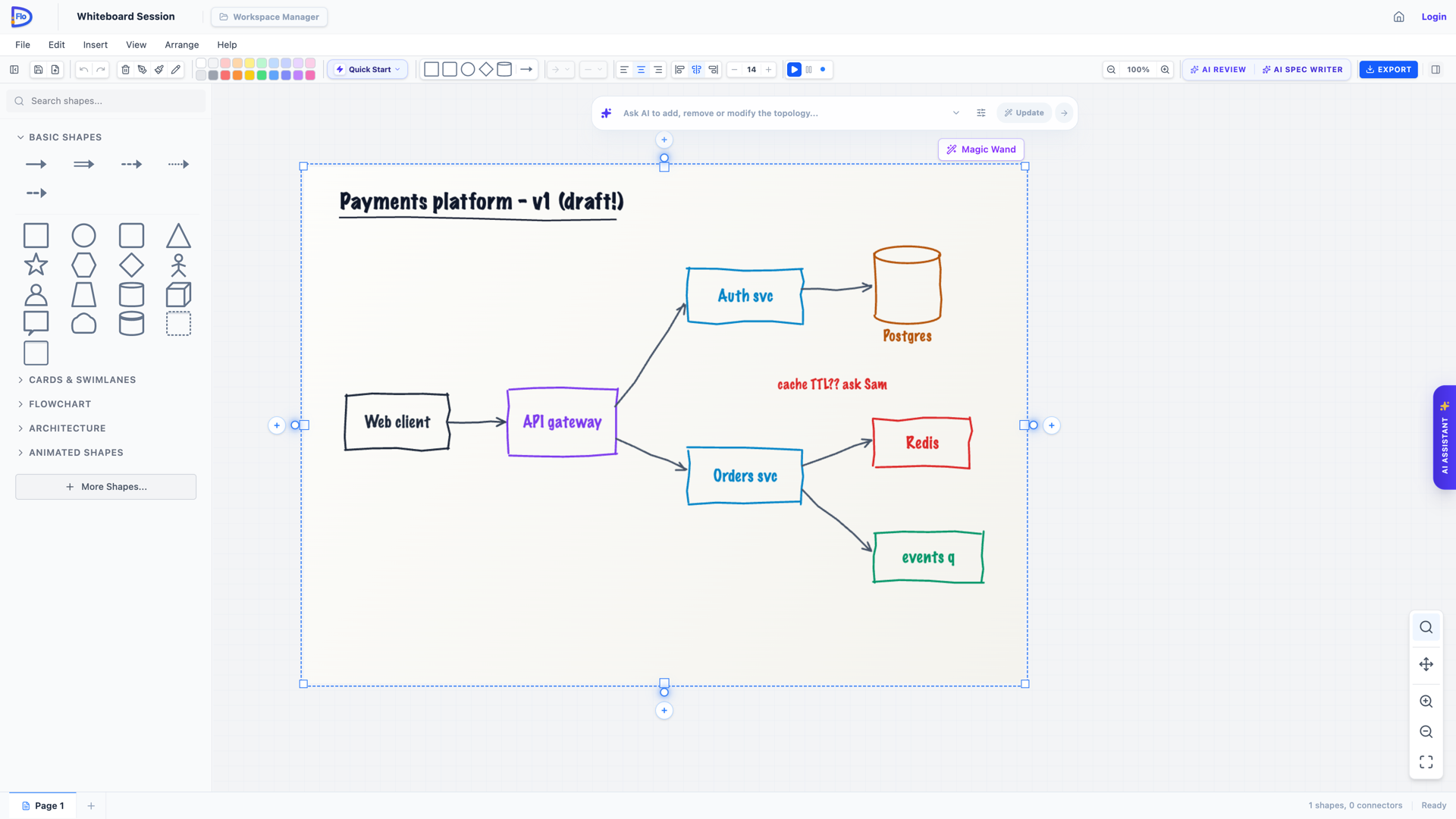
That's it. No tracing, no shape-by-shape reconstruction, no "close enough" approximations. And if the result isn't what you expected, a single undo restores the original image exactly as it was.
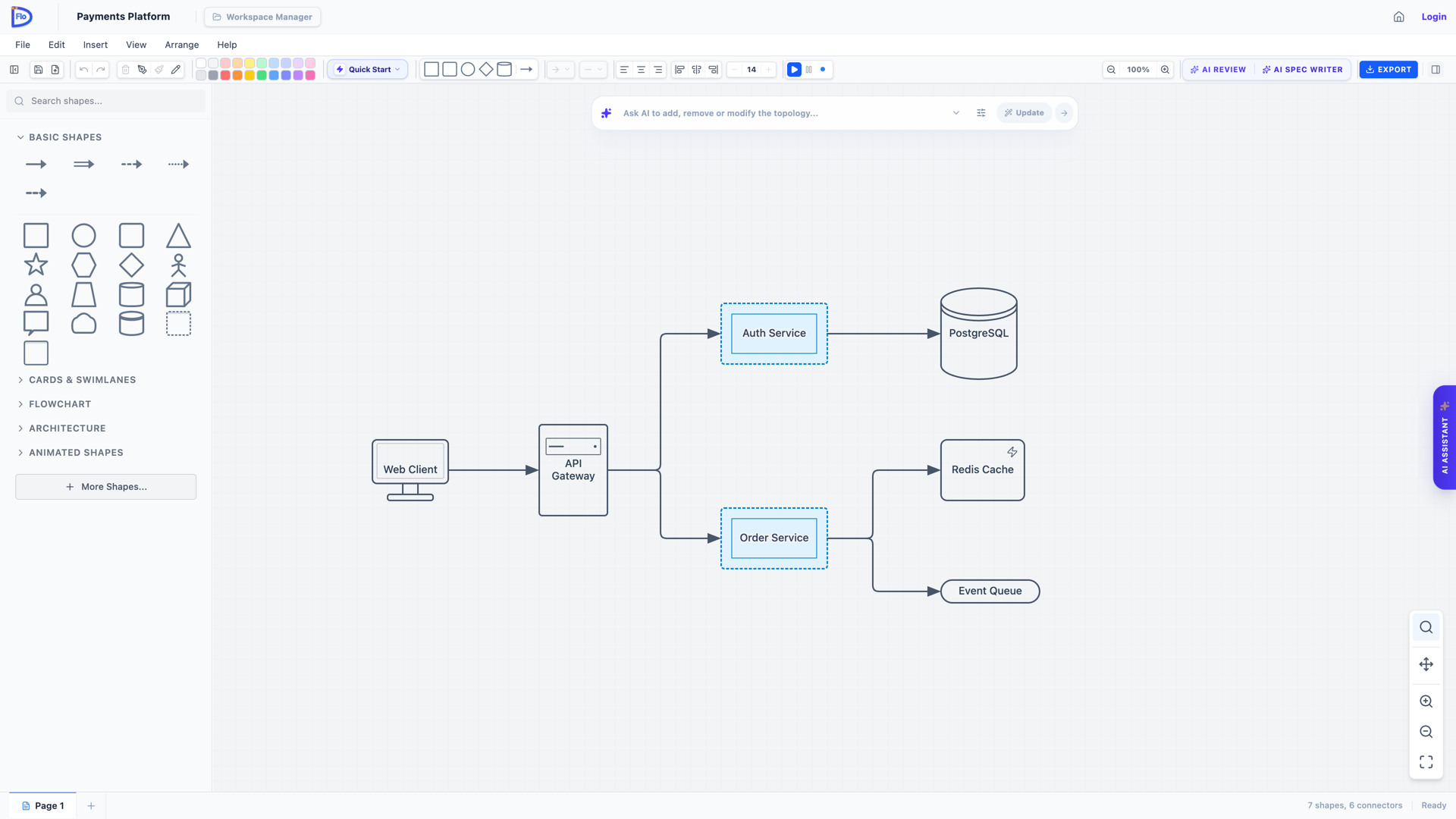
✏️ Try it yourself: open this exact diagram in FloDraw — fully editable, free, no sign-up needed.
Why This Speeds Up System Design
From Whiteboard to Working Design in One Step
Design thinking happens on whiteboards, napkins, and quick sketches — not in structured editors. The Magic Wand lets you keep it that way. Sketch freely with your team, photograph the result, and have a structured, editable version on the canvas before the meeting room is even empty. The friction between ideation and formalization disappears.
Rescue Legacy Diagrams from Static Formats
Most organizations have years of architecture knowledge locked inside PNG exports, PowerPoint slides, and screenshots of tools nobody licenses anymore. Rebuilding those diagrams by hand is so tedious that it usually just doesn't happen — the documentation stays frozen while the system evolves. With the Magic Wand, modernizing a legacy diagram takes seconds: screenshot it, paste it, convert it, and start editing where the original left off.
Unlock the Full AI Pipeline for Any Image
This is where the real acceleration kicks in. Once an image becomes a native FloDraw diagram, everything else in the platform applies to it:
- Run an AI Architect Review to probe the design for single points of failure, security boundaries, and missing components.
- Generate PRDs, RFCs, and ADRs from the diagram in Studio — turning last week's whiteboard photo into stakeholder-ready documentation saved right in your workspace.
- Compile an AI Handoff Bundle so Claude Code, Cursor, or Copilot implement code that conforms to the exact architecture your team sketched.
A photo can't be reviewed, versioned, or handed to an AI coding agent. A FloDraw diagram can. The Magic Wand is the bridge.
Built for Real-World Images
Behind the single click there's a vision model tuned specifically for architecture diagrams:
- Layout preservation: nodes are placed to match their positions in the source image, so your mental map of the design stays intact.
- Smart structure detection: layered views and capability maps are recognized and reconstructed with the appropriate diagram style, not flattened into generic boxes.
- Clean connections: arrows are resolved into proper attached connectors between the right shapes — no dangling lines to clean up afterwards.
Each conversion costs 2 AI credits, and you're only charged when the AI successfully recognizes a diagram in your image.
Try It on Your Oldest Diagram
The best way to feel the speed-up is to grab the most outdated architecture image in your wiki — the one everybody references but nobody dares to redraw — paste it into FloDraw, and click the wand. Thirty seconds later you'll have a living diagram you can review, evolve, and compile into specs.
Your whiteboard photos deserve better than a Slack thread. Give them a second life as real architecture.